Agent Integration
Integrate agents into your applications, websites, widgets, and backend services using Chocolate Factory’s public HTTP APIs.
Integration Endpoint
All agent invocations go through the unified /run endpoint (POST /api/agents/{agentId}/run). Set the Accept header to select the response mode:
Use Accept: text/event-stream when you are building a real chat experience — chat widgets, copilots, multi-turn conversations, and anything that should stream the response as it is generated.
Use Accept: application/json (default) when you want a single result back, like a normal API call — forms, content generation, prompt-template execution, backend jobs, and one-off actions.
Both modes invoke the same agent configuration, including its model, system prompt, tools, and knowledge sources.
Execution Modes
| Mode | Body fields | Typical Accept | Use when |
|---|---|---|---|
| 1 — Persisted | message + optional conversationId | text/event-stream or application/json | Chat UIs where Chocolate Factory stores history |
| 2 — Stateless | messages (full array) | text/event-stream | Your app owns the transcript |
| 3 — Prompt-only | vars only | application/json | Template-driven generation, no user turn |
See Run Endpoint for request examples, UIMessage format, and file attachment details.
| Accept header | Best for |
|---|---|
text/event-stream | Conversation UI, streaming, back-and-forth |
application/json | One request in, one JSON answer out |
Get Your Integration Details
Before calling the APIs, open the agent’s configuration page and scroll to the Integrations section. This is where you find the values needed to connect your application.
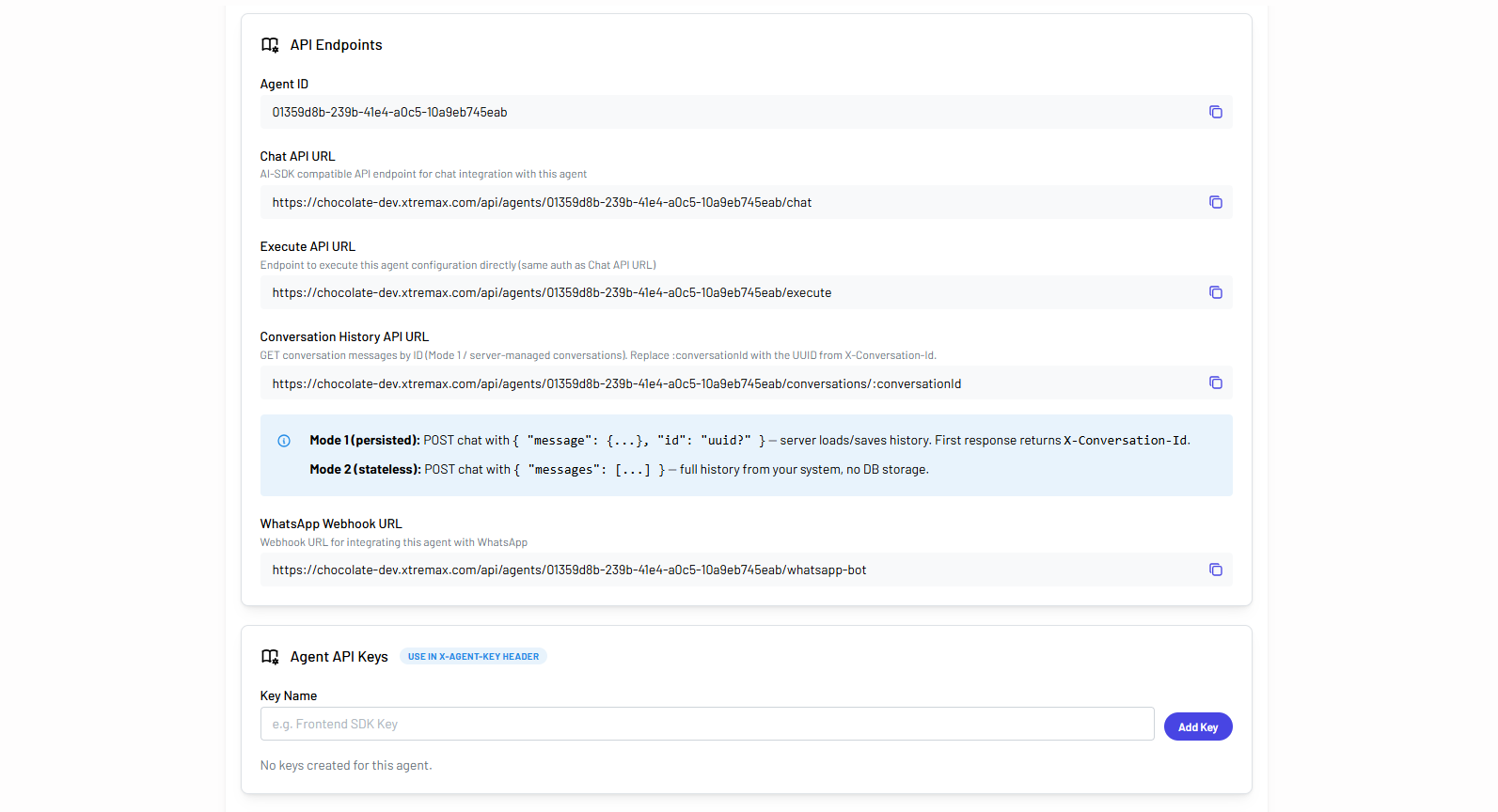
From this section you can copy:
- Agent ID → the unique identifier used in the API path (
/api/agents/{agentId}/...). - Run API URL → the full endpoint for both streaming and single-shot JSON requests.
Authentication
For machine-to-machine access without a signed-in user, authenticate with an agent API key or an organization API key.
| Key type | Header | Scope | Best for |
|---|---|---|---|
| Agent API key | x-agent-key | Single agent | Chat widgets, copilots, and integrations tied to one agent |
| Organization API key | cf-api-key | All agents in the organization | Backend services, automation platforms, and multi-agent workflows |
| Bearer token | Authorization | Signed-in user session | Applications where the user is already authenticated in Chocolate Factory |
Create an Agent API Key
Use an agent API key when your integration calls a specific agent and you want credentials scoped to that agent only.
- Open the agent’s configuration page.
- Scroll to Integrations → Agent API Keys.
- Enter a descriptive Key Name (for example,
Frontend SDK KeyorProduction Widget). - Click Add Key.
- Copy the generated key immediately (save the key since it is only shown once).
Pass the key in the x-agent-key request header on every API call.
x-agent-key: agk_xxxxxxxxxxxxxxxxxxxxxxxxxUse an Organization API Key
Alternatively, use an organization API key from Organization Settings. Organization keys can authenticate requests to any agent that belongs to the same organization.
See API Key Provisioning for full details on creating, using, and revoking organization API keys.
cf-api-key: cf_xxxxxxxxxxxxxxxxxxxxxxxxxxxxxxxxxxxxxxxxSee API Key Provisioning for full details on creating, using, and revoking organization API keys.
API keys are sensitive credentials. Store them securely and never expose them in source code repositories, client-side applications, or public documentation. Use environment variables or a secrets manager.