API Key Provisioning
Create and manage API keys for authenticating requests to Chocolate Factory APIs.
What are API Keys Provisioning ?
API keys allow external applications, scripts, and integrations to authenticate with Chocolate Factory APIs on behalf of your organization.
Organizations commonly use API keys to integrate Chocolate Factory with internal applications, automation platforms, backend services, and third-party systems.
API keys are sensitive credentials and should be stored securely. Never expose API keys in source code repositories, client-side applications, or publicly accessible locations.
Manage API Keys
The API Keys tab allows Organization Administrators to create, manage, and revoke API keys for their organization.
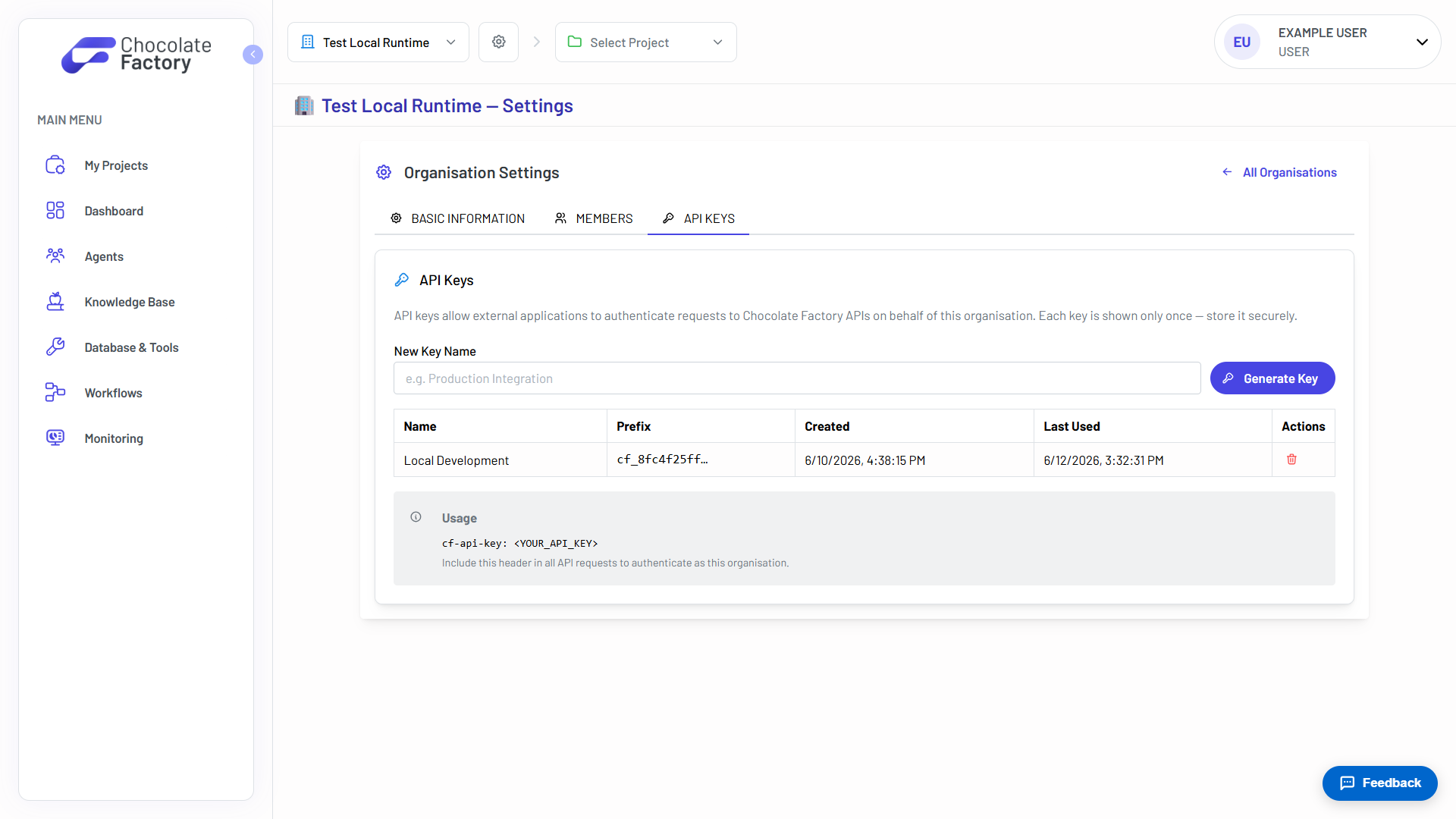
Each API key includes the following information:
- Name → A descriptive name used to identify the key.
- Prefix → A partial identifier used to distinguish between keys.
- Created → The date and time the key was generated.
- Last Used → The most recent usage timestamp.
- Actions → Available actions, such as deleting the key.
Creating an API Key
- Navigate to Organization Settings.
- Open the API Keys tab.
- Enter a descriptive name for the API key.
- Click Generate Key.
- Copy the generated API key and store it securely.
API keys are displayed only once when they are created. Be sure to copy and save the key immediately, as it cannot be viewed again later.
Using an API Key
When making requests to Chocolate Factory APIs, include the API key in the request header.
cf-api-key: <YOUR_API_KEY>The API key authenticates the request as your organization and grants access according to the permissions associated with the organization.
Deleting an API Key
- Navigate to Organization Settings.
- Open the API Keys tab.
- Locate the API key you want to remove.
- Click the Delete icon.
- Confirm the deletion.
Deleted API keys cannot be recovered. Any applications or integrations using the deleted key will immediately lose access.
Best Practices
- Use descriptive names to clearly identify each API key’s purpose.
- Create separate API keys for different applications and environments for development, testing, and production environments
- If an API key has been lost, delete the existing API key and generate a new API key.
- Regularly review API key usage and remove unused keys.
- Store API keys in a secure secret manager or vault.
- Revoke API keys immediately if they are suspected to be compromised.
- Avoid sharing API keys through email, chat applications, or documentation.